MultiModulon Worflow
This notebook demonstrates the first step for multi-species/strain/modality analysis using the MultiModulon package.
Step 1: Initialize MultiModulon
Load data from the Input_Data directory containing expression matrices, gene annotations, and sample metadata for all strains.
# Import required libraries
from multimodulon import MultiModulon
import pandas as pd
import numpy as np
import matplotlib.pyplot as plt

# Set display options
pd.set_option('display.max_columns', None)
pd.set_option('display.max_rows', 50)

# Path to the Input_Data folder
input_data_path = './Input_Data'

# Initialize MultiModulon object
multiModulon = MultiModulon(input_data_path)
Step 2: Create Gene Tables
Parse GFF files to create gene annotation tables for each strain.
# Create gene tables from GFF files
print("Creating gene tables from GFF files...")
multiModulon.create_gene_table()

multiModulon.add_eggnog_annotation("./Output_eggnog_mapper")
Step 3: Generate BBH Files
Generate Bidirectional Best Hits (BBH) files for ortholog detection between all strain pairs.
# Generate BBH files using multiple threads for faster computation
output_bbh_path = './Output_BBH'

multiModulon.generate_BBH(output_bbh_path, threads=16)
Step 4: Align Genes Across Strains
Create a unified gene database by aligning genes across all strains using the BBH results.
# Align genes across all strains
output_gene_info_path = './Output_Gene_Info'

combined_gene_db = multiModulon.align_genes(
    input_bbh_dir=output_bbh_path,
    output_dir=output_gene_info_path,
    reference_order=['MG1655', 'BL21', 'W3110'],  # optional: specify order
    # bbh_threshold=90  # optional: minimum percent identity threshold
)

combined_gene_db.head()
Step 5: Generate Aligned Expression Matrices
Create expression matrices with consistent gene indexing across all strains for multi-view ICA.
# Generate aligned expression matrices
print("Generating aligned expression matrices...")
multiModulon.generate_X(output_gene_info_path)

# The output shows aligned X matrices and dimension recommendations
Step 6: Optimize Number of Core Components
Determine the optimal number of core components.
# Optimize number of core components
print("Optimizing number of core components...")
print("This will test different values of k and find the optimal number.")

optimal_num_core_components = multiModulon.optimize_number_of_core_components(
    step=10,                        # Test k = 5, 10, 15, 20, ...
    save_path='./Output_Optimization_Figures',  # Save plots to directory
    fig_size=(7, 5),                # Figure size
    num_runs_per_dimension=10,
    seed=10
)
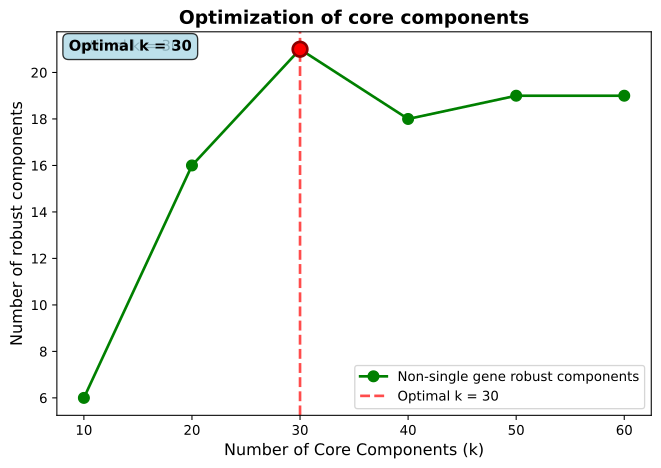
Core component optimization result.
Step 7: Optimize Number of Unique Components
Determine the optimal number of unique (species-specific) components for each strain.
# Optimize unique components for each species
print("Optimizing unique components per species...")
print("This will test different numbers of unique components for each species.\n")

optimal_unique, optimal_total = multiModulon.optimize_number_of_unique_components(
    optimal_num_core_components=optimal_num_core_components,
    step=10,
    save_path='./Output_Optimization_Figures',
    fig_size=(7, 5),
    num_runs_per_dimension=10,
    seed=10
)
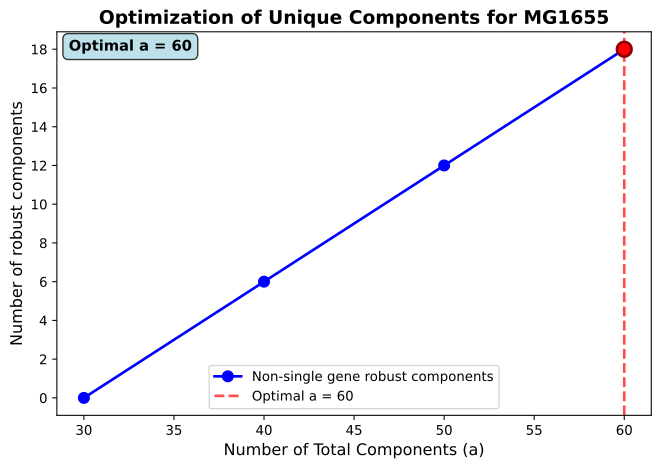
Unique component optimization result for MG1655.
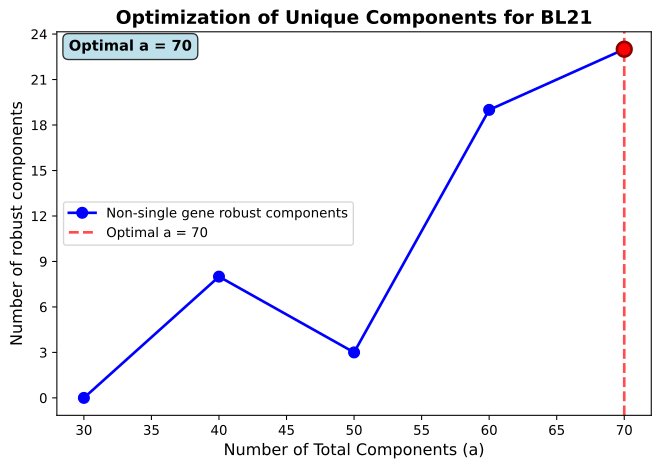
Unique component optimization result for BL21.
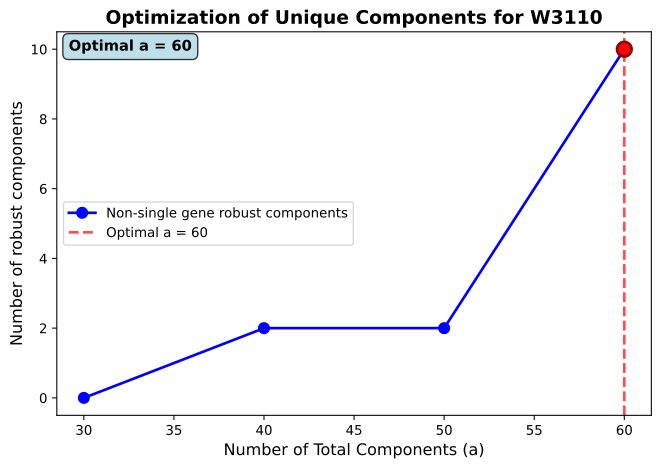
Unique component optimization result for W3110.
optimal_num_core_components

optimal_total
Step 8: Run Robust Multi-view ICA
Perform robust multi-view ICA with multiple runs and clustering to identify consistent components.
# Run robust multi-view ICA
print("Running robust multi-view ICA with clustering...")
print("This performs multiple ICA runs and clusters the results for robustness.\n")

M_matrices, A_matrices = multiModulon.run_robust_multiview_ica(
    a=optimal_total,                 # Dictionary of total components per species
    c=optimal_num_core_components,   # Number of core components
    num_runs=10,                     # Number of runs for robustness
    seed=100                         # Random seed for reproducibility
)
Step 9: Optimize thresholds to binarize the M matrices
Use Otsu’s method to calculate thresholds for each component in M matrices across all species.
multiModulon.optimize_M_thresholds(method="Otsu's method", quantile_threshold=95)
Step 10: Save the multiModulon object to json
Save the multiModulon object to json in the given path and file name.
multiModulon.save_to_json_multimodulon("./multiModulon_E_coli_comparison_demo.json.gz")

for i in multiModulon.species:
    print(i, " : ", multiModulon[i].M.shape)